Stop rebuilding LLM integrations.
Smart routing. Local. Open.
BeigeBox sits between your app and any language model—automatically routing to cheaper models, caching expensive responses, and switching backends without touching your code. Zero frontend changes. Transparent to clients, invisible to backends.
- 🎯 Smart routing · automatic model selection
- 💾 Response cache · no redundant API calls
- 🧩 Multi-backend support · OpenRouter + Ollama + OpenAI-compatible
- ⚡ Local-first storage · SQLite + ChromaDB
- 🚀 One HTML file UI · no build step
- ✅ Production-ready · Apache 2.0 license
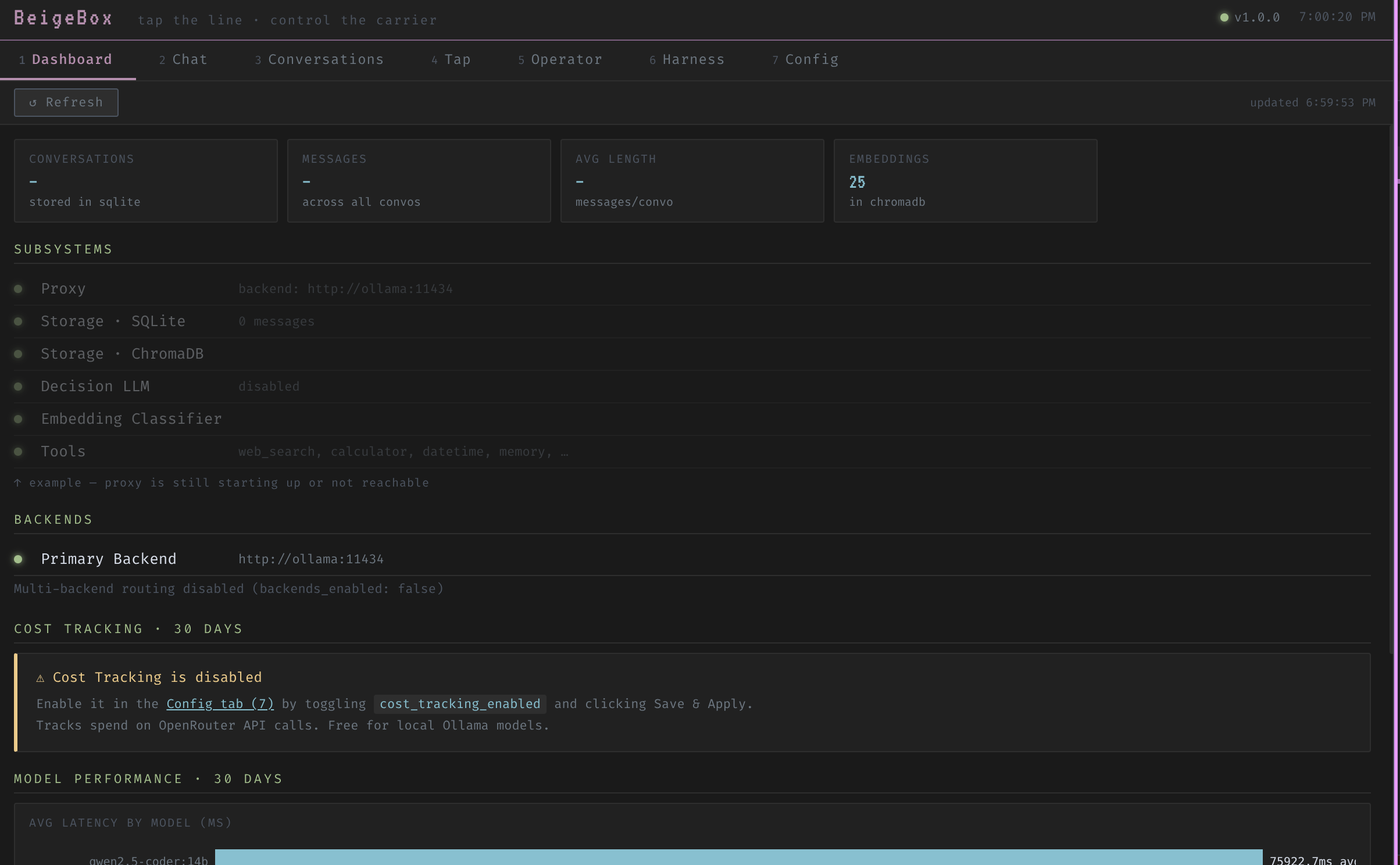
Unique Features
Capabilities you won't find assembled anywhere else.
Semantic response cache
Responses are cached by meaning using cosine similarity, not by exact string or TTL. Near-identical questions return instantly — no backend round-trip, no model load.
WASM post-processing pipeline
Drop any WASI-compiled module into wasm_modules/. BeigeBox buffers the stream, pipes it through your transform (stdin → stdout), and re-emits the clean result. Any language, zero Python deps.
Council mode with model affinity batching
Fan a single prompt out to multiple models simultaneously, then vote, merge, or surface the best answer. Model-affinity ensures each council member stays on the backend it performs best on.
Trajectory evaluation scoring
Every agentic run is scored end-to-end: tool selection, reasoning chain, and final answer quality. Scores surface in the dashboard so you can compare models on real tasks, not synthetic benchmarks.
Session-sticky multi-turn routing
The routing decision for turn 1 is cached for the whole conversation. A code session stays on the code model; a chat session stays on the fast model — no mid-conversation backend flips.
Operator with persistent notes
The operator agent writes structured notes to a persistent memory store between runs. Across sessions it recalls context, tool results, and prior reasoning — no re-discovery from scratch each time.
How it works
-
Ingest.
Any OpenAI-compatible client hits
localhost:1337/v1. No changes to your client, frontend, or tools required. - Cache check. The request is embedded and checked against the semantic cache. A sufficiently similar previous query returns the cached response immediately — no backend round-trip, no model load.
- Classify & route. A 4-tier pipeline picks the right model: Z-command overrides → agentic keyword scorer → embedding classifier (~50 ms) → decision LLM for borderline cases. Session-sticky so conversations stay on one model.
- Execute. The request forwards to the chosen provider — Ollama, OpenRouter, or any OpenAI-compatible endpoint. BeigeBox streams the response back transparently with latency-aware failover.
- Transform. If a WASM module is active, BeigeBox buffers the full stream, runs the transform, and re-emits. The client always sees the final output — not raw intermediate fragments.
- Log, embed & measure. Every event writes to a structured JSONL wire log and SQLite. Responses embed into ChromaDB for semantic memory. Latency, TTFT, token counts, and cost surface in the dashboard.
Quick start
Get running in 2 minutes
Full stack with Ollama + BeigeBox — Docker Compose does the rest.
git clone --recursive https://github.com/ralabarge/beigebox.git
cd beigebox/docker
cp env.example .env        # optional — set GPU, ports, API keys
docker compose up -d
Open http://localhost:1337 for the web UI.
The OpenAI-compatible API is at http://localhost:1337/v1.
Optional: Add profiles for browser automation, voice I/O, or alternative inference engines.
Other setups:
Already have Ollama/another provider?
Run just BeigeBox in front of it. Set backend.url in config.yaml to your existing provider.
git clone --recursive https://github.com/ralabarge/beigebox.git
cd beigebox/docker
cp env.example .env
docker compose up -d beigebox
Then update config.yaml to point to your Ollama/OpenRouter/custom API endpoint.
Dev mode (hot-reload)
Edit config.yaml or runtime_config.yaml — changes take effect immediately, no restart.
pip install -e .
cp config.example.yaml config.yaml
beigebox dial
FastAPI at localhost:8000 · docs at /docs
http://localhost:1337/v1 — zero code changes needed.
Docker Compose profiles (optional)
Browser automation (CDP): docker compose --profile cdp up -d
Voice I/O (STT + TTS): docker compose --profile voice up -d
Both: docker compose --profile cdp --profile voice up -d
Alternative engines: llama.cpp (engines-cpp), vLLM (engines-vllm), ExecutorTorch (engines-executorch)
Deploy anywhere
BeigeBox is self-hosted and portable. Choose your platform:
🐳 Docker Compose
The simplest path. Includes Ollama, BeigeBox, and all dependencies. .env controls everything — GPU, ports, model pulls.
See deploy/docker/ for production variant with volume mounts.
☸ Kubernetes
Deployments, Services, ConfigMaps, PVCs ready to go. Includes resource requests/limits, liveness + readiness probes, and security context.
See deploy/k8s/ for YAML manifests.
🖥 Bare Metal
Systemd unit file for Linux servers. Virtual environment support, security hardening, and environment variable overrides included.
See deploy/systemd/ for unit template.
Who is this for
Perfect for you if:
- ✓ Running Ollama or multiple LLM providers
- ✓ Building LLM-powered features in an app
- ✓ Want to reduce LLM API costs (route to cheaper models)
- ✓ Need observability into LLM usage (latency, cost, tokens)
- ✓ Self-hosted teams keeping data on-prem
- ✓ Evaluating how different models perform on your workload
Not for you if:
- ✗ You only use OpenAI (no multi-model benefit)
- ✗ Your only concern is latency (caching helps but isn't the main goal)
- ✗ You prefer managed cloud solutions (BeigeBox is self-hosted)
- ✗ You have minimal LLM usage (overhead of routing > gains)
What makes it different
Most LLM proxies do passthrough and load balancing. BeigeBox goes further.
An LLM that routes to other LLMs
The routing pipeline has four tiers. Simple cases never touch a model. Borderline cases get evaluated by a small, fast decision LLM before dispatch. Session-sticky so a conversation stays on one model.
- tier 1 Z-command user overrides (instant, inline)
- tier 2 Agentic keyword scorer (zero-cost pre-filter)
- tier 3 Embedding classifier (~50 ms cosine distance)
- tier 4 Decision LLM for borderline cases
Semantic response cache
Not a TTL cache. Every query is embedded with nomic-embed-text and checked against stored responses by cosine similarity. A sufficiently similar question gets an instant answer — no model load, no backend round-trip.
Combined with an embedding dedup cache (avoids redundant embeds) and a tool result cache (SHA-256 keyed, short TTL for deterministic tools).
WASM post-processing pipeline
Drop a compiled .wasm (WASI target) into wasm_modules/. BeigeBox buffers the full response stream, runs the transform (stdin → stdout), and re-emits. The client always sees the transformed output.
Any WASI-targeting language: Rust, C, Go, AssemblyScript. Timeout-enforced — if the module hangs, the original response passes through unmodified. Included: opener_strip removes sycophantic openers.
Latency-aware multi-backend routing
Each backend tracks a rolling P95 latency window over 100 samples. Backends that exceed a configurable threshold are automatically deprioritised to second-pass fallback — traffic returns when they recover.
A/B traffic splitting via traffic_split weights. Weighted random selection among healthy backends for percentage-based distribution.
Three multi-model orchestration modes
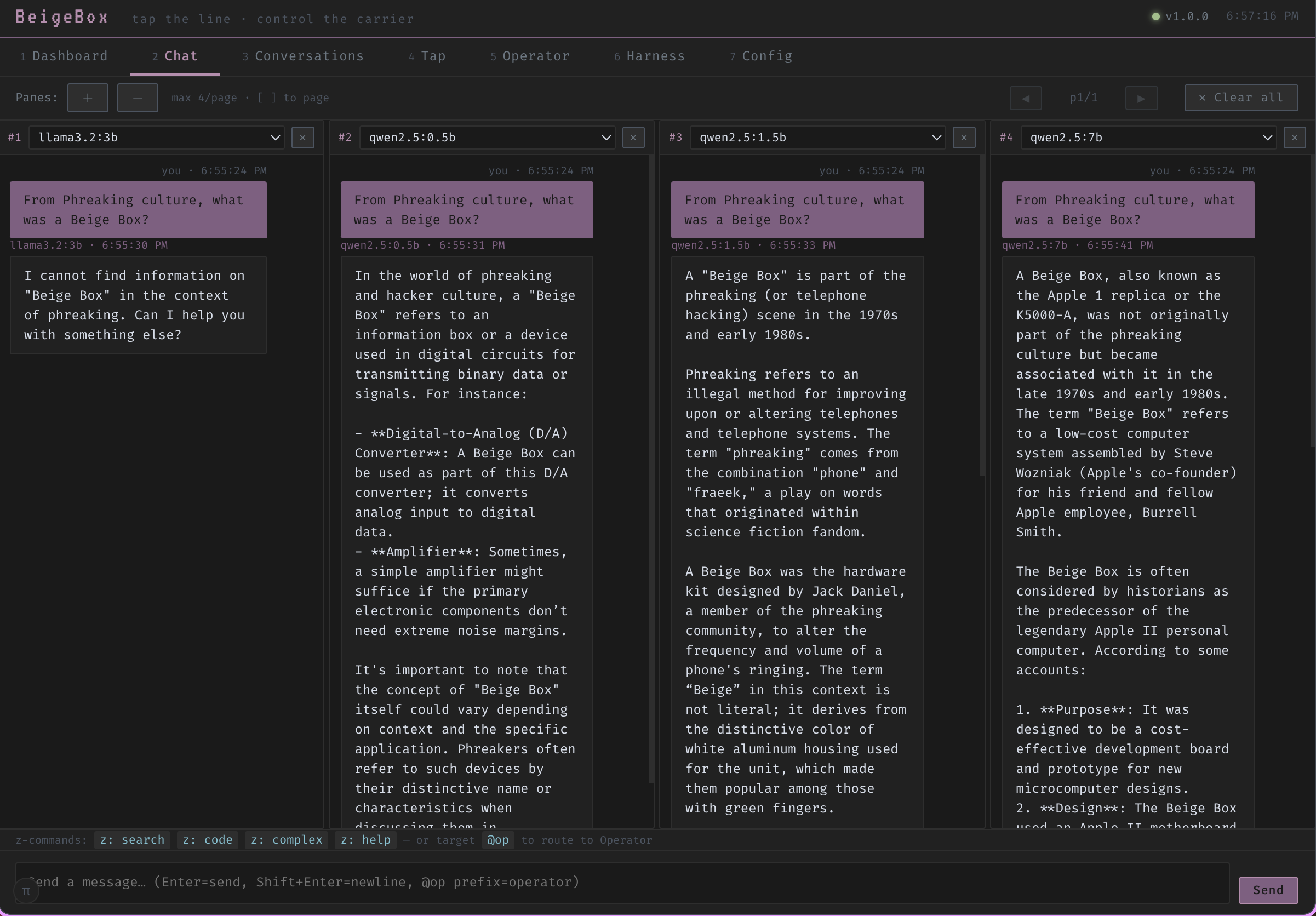
Run the same prompt across N models simultaneously and compare, vote, or iterate:
- harness Side-by-side comparison, no arbiter
- ensemble LLM judge picks the best response with reasoning
- orchestrate Goal-driven loop: plan → dispatch → evaluate → iterate (SSE stream)
Built-in UI — one HTML file
Seven-tab interface with no build step, no JavaScript framework, no dependencies. Dashboard, multi-pane Chat, Conversations, Tap (live wire log), Operator, Harness, Config.
Per-pane chat settings: temperature, top-p/k, context window, repeat penalty, GPU layer count, force-reload (evicts model from VRAM for immediate effect), and per-pane system prompt.
Full feature set
Routing & delegation
4-tier pipeline with session-sticky assignment. Per-backend priority ordering with automatic health-check failover. Force a route with a Z-command at any time.
Semantic + tool caching
Semantic cache (cosine similarity), embedding dedup cache, and SHA-256 tool result cache. Three layers, all in-process, zero extra services.
Multi-backend with A/B splitting
Ollama, OpenRouter, or any OpenAI-compatible endpoint. Weighted traffic distribution. Rolling P95 auto-deprioritization with automatic recovery.
Observability
Structured JSONL wire log (TTFT, P50/P90/P95/P99, tokens/sec, cost), SQLite conversation history, per-model hardware stats (GPU layers, VRAM, context window), verbose agentic logging (thoughts, tool calls, iterations), and live backend health dashboard with latency tracking.
Harness + ensemble + orchestration
Three multi-model modes. Ensemble voting with an LLM arbiter that returns reasoning. Goal-driven orchestration via SSE stream for long-running tasks.
Operator agent
JSON tool-loop agent with web search, calculator, datetime, system info, memory recall, and ensemble. Shell execution through a 4-layer bubblewrap sandbox (no network, no home dir).
Conversation replay & fork
Any stored conversation reconstructed and re-run against a different model or config. Fork a conversation mid-thread without affecting the original branch.
Local-first storage
SQLite for conversations, metrics, and cost. ChromaDB (embedded, no separate service) for vectors. Portable files — your data, no cloud dependency.
Per-model GPU options
Set options.num_gpu per model in config.yaml. Override per chat pane. Force-reload evicts from VRAM and reloads immediately — no restart required.
Hooks & plugins
Pre/post request interceptors for prompt injection detection, RAG injection, and custom policy. Drop a *Tool class in plugins/ to auto-register a new tool.
System context injection
Hot-reloaded system_context.md prepended to every request. Override per chat pane with a window-specific system prompt — the ⚙ button glows when active.
Voice (optional profile)
Whisper (STT) + Kokoro (TTS) via Docker Compose voice profile. Push-to-talk with configurable hotkey. Auto-play TTS after each response. No changes to core proxy required.
Per-endpoint timeouts
Configure timeout_ms per backend. Ollama on slow hardware? Use 120s. OpenRouter? 60s. Prevents one slow backend from stalling the router. Overrides per-backend, hot-reloadable.
Response format validation
Optional JSON/XML/YAML schema enforcement. Validates final responses before caching. Non-blocking — validation failures logged but responses still forwarded. Helps catch malformed outputs early.
Browser automation (CDP)
Operator agent can control Chrome via DevTools Protocol. Navigate pages, take screenshots, click elements, read DOM, type text. Full I/O captured for cross-task context. Phase 1 live, more coming.
MCP server
Model Context Protocol server at POST /mcp. Expose BeigeBox tools to Claude Desktop, external agents, and third-party MCP clients. All tools + operator/run + skills as resources. Works with header auth.
OAuth2 web UI auth
Optional OAuth2 authentication for the web UI. Google provider included with PKCE S256. User sessions gated via signed cookies. Expandable provider protocol for GitHub, Discord, etc. Multi-user conversation isolation roadmap.
Z-commands
Prefix any message with z: to override routing, force tools, or branch a conversation — without leaving the chat.
UI snapshots
Built-in seven-tab web interface. No build step, no framework, one HTML file.
Licensing
BeigeBox is dual-licensed to support both open-source and commercial use.
AGPL-3.0 (Free)
Use, modify, and distribute freely.
- ✓ Open-source projects
- ✓ Internal use
- ✓ Non-commercial use
- ✓ Public modifications required
If you modify BeigeBox and run it as a service, you must share your modifications.
Read full AGPL terms →Commercial License (Paid)
Use in proprietary products.
- ✓ Proprietary/closed-source use
- ✓ SaaS & managed services
- ✓ Keep modifications private
- ✓ No open-source obligations
For enterprise deployments, commercial products, or proprietary modifications.
Learn more about commercial licensing →